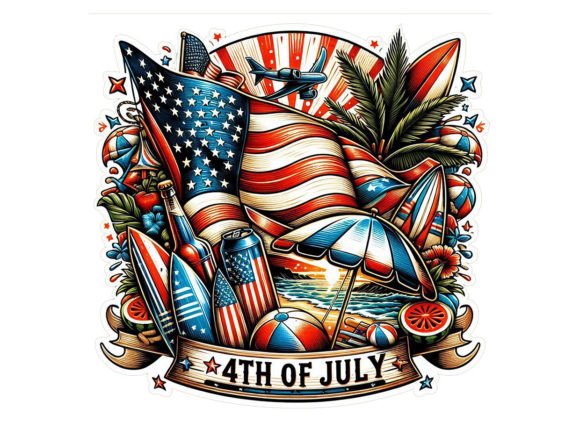
4th of July Surf Club Clipart Design
When patriotic themes meet coastal surf culture, the result is a fresh visual language that feels both nostalgic and modern. The 4th of July Surf Club Clipart Design brings together red, white, and blue symbolism with beachy, retro surf aesthetics. Whether you are designing for a small business, a personal project, or a seasonal campaign, this style offers a versatile foundation that works across print and digital formats. Each element is intentionally crafted to be resizable, scalable, and easy to integrate into your existing workflow.
What Makes This Design Style Stand Out
At first glance, the combination of Independence Day motifs and surf club imagery might seem unexpected. But that contrast is exactly what makes it compelling. Stars, stripes, and classic Americana merge with wave graphics, retro surfboards, palm silhouettes, and bold typography. The result feels celebratory without being generic, and coastal without being seasonal. This is not just another set of clipart; it is a curated visual toolkit that can be adapted for audiences who love both the beach and their country. The designs lean on vintage surf club aesthetics while staying crisp and clean enough for modern applications.
Each graphic is provided as a PNG file with a transparent background, so you can layer them onto any base color or texture without extra cleanup work. The resolution sits at 3600 x 3600 pixels with 300 dpi, meaning your prints will hold sharp lines and saturated colors whether you are outputting at small scale or large format. You also receive an SVG print design file, which gives vector flexibility for those who prefer to edit paths, change colors, or scale without any loss in quality. This combination of formats ensures compatibility across platforms like Canva, Photoshop, Illustrator, or even Cricut Design Space.
Creative Applications Across Products
One of the strongest advantages of this clipart collection is how naturally it translates to physical products. Because the designs are built around surf club aesthetics, they already carry a lifestyle feel that works well on apparel and home goods. Here are several product categories where these graphics shine:
- T-shirts and tank tops: The surf club look pairs well with distressed or vintage-style prints. A bold wave graphic combined with stars and a retro badge fits centered chest prints or larger back designs. Because the PNG has a transparent background, you can mock up a tee in seconds and test color placements.
- Mugs and drinkware: Coastal Independence Day designs feel right at home on a ceramic mug or a tumbler. The 3600-pixel resolution means your text and details stay crisp even on cylindrical surfaces that often distort lower-resolution art.
- Signs and decor: Whether for a beach house, a summer rental, or a backyard barbecue, these clipart pieces can be printed on wood, canvas, or metal. The high DPI and large canvas size let you produce signs up to 12x12 inches at full quality.
- Cards and invitations: If you are hosting a July 4th gathering with a surf or coastal theme, these designs give your invites an instantly recognizable look. Pair a wave illustration with a bold headline, and your printed or digital card will feel cohesive and intentional.
- Stickers and labels: Because each element is isolated with a transparent background, you can shrink or crop individual graphics for sticker sheets, product labels, or party favors. The PNG format preserves smooth edges without halos.
The same files can be repurposed across multiple products without needing to rebuild or reposition elements from scratch. This saves time and keeps your brand visuals consistent.
Adapting the Design for Different Audiences
A clipart set that mixes surf and patriotism can serve more than one demographic. How you use it depends on the tone you want to set and the people you are designing for. Creators and small business owners can tailor the same set to different niches without buying additional assets.
For a younger, trend-driven audience, try pairing the surf club graphics with bold sans-serif typography, neon accents, or a slightly gritty texture overlay. The retro surf club aesthetic already resonates with streetwear and skatewear circles, so adding a 4th of July twist gives it a limited-edition feel. If your target audience skews older or more family-oriented, you can soften the color palette, use warmer whites and navy blues, and combine the clipart with script fonts and framed layouts. The same wave and star motifs will read as classic rather than edgy.
Bloggers and content creators can use these graphics as featured images for seasonal posts, social media banners, or newsletter headers. The transparent PNG makes it easy to drop the design onto a photograph of the ocean, a picnic table, or a sunset sky. For educators or hobbyists running summer camps or community events, these clipart elements can be used in coloring sheets, activity pages, or signage that needs to look appealing without requiring advanced design skills.
Practical Guidance for Keeping Your Designs Clean
Working with high-resolution clipart is forgiving, but there are a few habits that will help your final product look professional. First, always check your canvas size before importing the PNG. At 3600 x 3600 pixels, this asset is larger than most project canvases, so you will typically scale down rather than up. Scaling down preserves sharpness. Scaling up can introduce pixelation, though with a 300 DPI source, you have plenty of room for large prints before quality degrades.
Second, take advantage of the transparent background to create layered compositions. Instead of placing the clipart on a solid white rectangle, drop it directly onto a textured background, a photograph, or a gradient. This is where the SVG file becomes valuable. If you open the SVG in a vector editor, you can adjust individual color swatches to match your brand palette. For example, you could shift the red to a deeper crimson or the blue to a more nautical navy while keeping the white highlights intact.
Third, maintain visual hierarchy when combining multiple elements. A surf club badge with a wave, a star, and a bold "4th of July" text block should have one focal point. Typically, the typography or the central icon should dominate, with supporting graphics staying smaller or placed around the edges. Overcrowding reduces legibility, especially on small products like mugs or stickers. The beauty of having each element as a separate PNG is that you can control spacing and overlap with precision.
Finding Your Own Visual Direction
One of the most enjoyable aspects of working with this kind of clipart is the range of stylistic directions you can pursue. The surf club motif naturally invites retro, 80s, or even 90s neon vibes. You can lean into that by pairing the designs with grainy textures, halftone patterns, or faded color treatments. Alternatively, you can push toward a minimalist modern look by using only the outline versions of the elements, keeping the palette monochromatic with a single accent color.
For anyone designing for a brand or a business, consistency across products matters more than any single design. If you are launching a limited 4th of July collection, choose two or three core graphics from the set and use them across your t-shirts, mugs, and bags. Repetition builds recognition. Customers who see the same wave and star motif on different items will start associating that look with your brand. The PNG and SVG files make it easy to keep those core graphics identical in size, color, and placement across all your mockups.
Freelancers and marketers working with multiple clients can also benefit from the modular nature of this set. One client might need a bold, poster-style design for a beachside event. Another might want something subtle and elegant for a coastal resort's Independence Day dinner. The same clipart can serve both, just by adjusting composition, color treatment, and typography. Because the files are high resolution and separate, you never have to compromise on quality or start from scratch.
Format and File Compatibility
Understanding what you are working with helps you avoid technical hiccups. The main file types provided are PNG with a transparent background and SVG. The PNG is a raster format, ideal for web use, social media graphics, and print projects where you want crisp edges and smooth gradients. The SVG is a vector format, which means you can open it in programs like Adobe Illustrator, Inkscape, or Affinity Designer and edit individual paths, change colors globally, or scale it to billboard size without any loss.
Because the PNG comes at 3600 x 3600 pixels, you can print at sizes up to 12x12 inches at 300 DPI without interpolation issues. For larger prints, the SVG route is your best option. If you plan to use the designs with a cutting machine like Cricut or Silhouette, the SVG file will give you clean cut lines and allow you to separate layers for different colored vinyl. The transparent PNG also works well for print-on-demand services like Printful, Redbubble, or Teespring, where you upload directly and the platform handles the rest.
The 300 DPI specification ensures that even small text and thin lines in the clipart remain sharp when printed. Low-resolution clipart often blurs or pixelates when printed, but at this resolution, your designs will look professional across all standard print media. Always set your document resolution to 300 DPI from the start to match the source file. If you work at 72 DPI for web and later try to print, you may see unexpected softening.
Making the Most of a Single Set
A well-designed clipart collection should feel like a toolbox, not a one-use asset. With the 4th of July Surf Club Clipart Design, you have elements that can be rotated, mirrored, recolored, and combined to create entirely new compositions. Do not feel locked into the arrangement shown in the preview. Experiment with flipping a wave graphic so it flows in the opposite direction, or layer a star pattern behind your main text for added depth. Small variations keep your work fresh and help you avoid the cookie-cutter look that generic clipart sometimes produces.
For those who enjoy iterating, try creating a monochrome version of a design using only the SVG file. Strip out the original colors and replace them with a two-tone scheme that matches your brand. This is especially useful for embroidery projects, where thread colors are limited and contrast matters more than gradient. The same goes for screen printing: a simplified, two-color version of the clipart will separate cleanly and reduce setup costs.
Ultimately, the value of this clipart lies in its flexibility. Whether you are a designer building a full product line, a blogger creating seasonal content, or a small business owner looking for a unified look across multiple items, these files give you a solid starting point. The combination of surf club aesthetics and patriotic themes is distinct enough to feel original, yet familiar enough to resonate with a wide audience. With the right layout, thoughtful color choices, and attention to scale, you can produce work that looks custom, cohesive, and ready for real-world use.